
Financial Aid Acknowledgement Requirement – Confirmation Activity
Students receiving financial aid must confirm participation in each enrolled course by completing the Financial Aid activity in Blackboard within the first two weeks after the start date of your course.
This confirmation documents that you have begun attending your course(s). The activity is required for each course in Blackboard, it’s quick and easy. Failure to complete this requirement may result in financial aid adjustment or cancellation.
Frequently Asked Questions
Why do I need to complete the financial aid acknowledgement requirement?
- Students on financial aid must complete the activity for every course they are registered for to continue receiving full financial aid funding.
- A federal financial requirement for higher education institutions mandates that students receiving financial aid must confirm they have started the semester.
- If the records are not able to confirm that the student has started the course via this Blackbird activity, financial aid may result in being adjusted or pulled back.
Where can I complete the required activity?
You can find the Financial Aid activity on Blackboard as an assignment under each of your courses. It’s labeled:
“Financial_Aid_Acknowledgement_Requirement (Term)”
NOTE: Term will reflect the current semester (ex. Summer 2026, etc.)
How long will the activity take?
It takes less than a minute to complete per course. It is a one-question activity to ensure the student confirms they have started the semester.
What’s the deadline to confirm I started the semester?
Students are required to complete the Financial Aid Acknowledgement activity within the first two weeks after the start date of your course. After that period, if the student has not confirmed through the activity, financial aid might be adjusted or pulled back.
Who can I contact if I have any questions?
If I don’t receive financial aid, do I still need to complete the activity?
Yes, completing the activity aids our records have an accurate count of student participation regardless of financial funding status and confirms your acknowledgement in the case that you receive financial aid in future terms.
What do I do if I am not able to see this activity once my course has started?
How to Complete the Financial Aid Acknowledgement Requirement
- Log in to your Blackboard account using your student credentials to complete your Financial Aid Acknowledgement Requirement.
- Navigate to each of your enrolled course(s) and locate the activity titled “Financial Aid Acknowledgement Requirement (Term).” NOTE: Term will reflect the current semester (ex. Summer 2026, etc.)

- Click on the activity and complete the one-question assessment confirming that you have received the course syllabus and understand the course expectations.
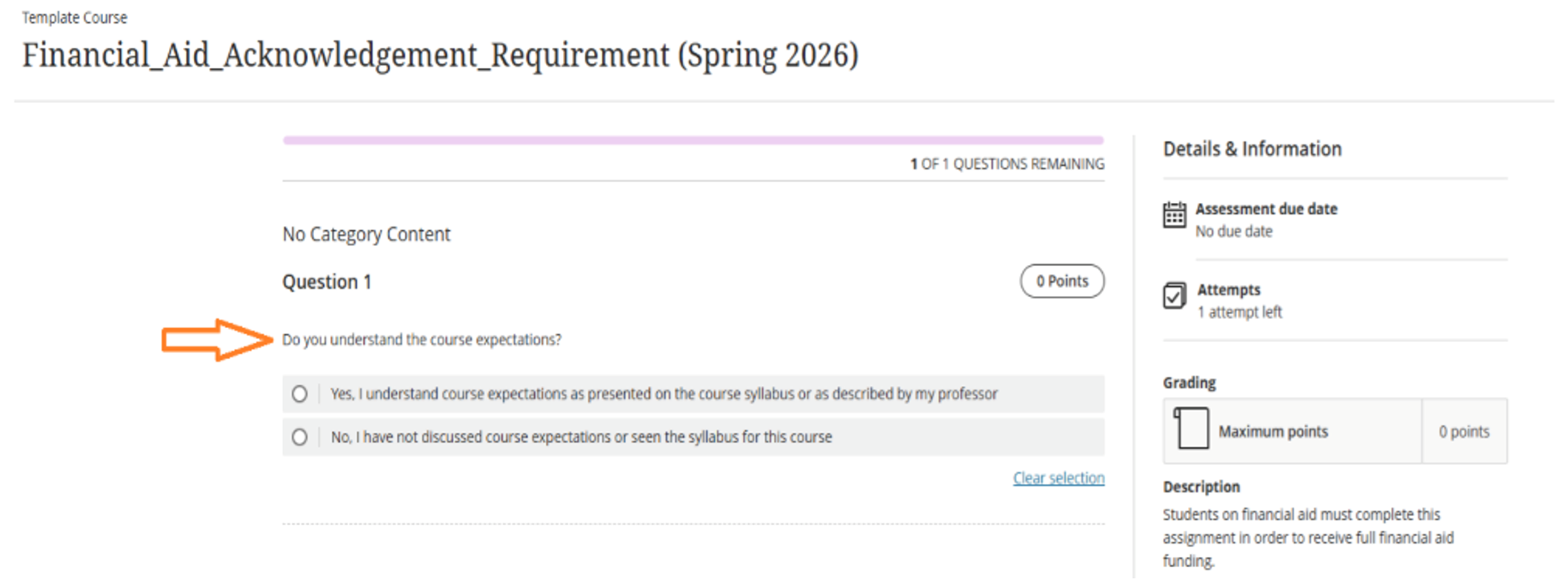
- Submit the activity and repeat these steps for every course you are registered for to confirm course attendance and securing your financial aid funding.
- You can also watch the video tutial here.


