
Integrating and Developing Microcredentials
Are you interested in helping UTEP students acquire new skills, expand their knowledge, and demonstrate what they have learned? You can do that with microcredentials. Industry-developed and recognized microcredentials can be integrated into curriculum, or you can develop a new microcredential for a class, a major, a club, all students at UTEP, or learners anywhere!
 If you are interested in learning more about microcredentials and/or are considering developing one yourself, you can enroll in the University of Texas System Microcredential Innovator course. This free, self-paced online course provides a primer on microcredentials and prepares faculty and staff to create them. A badge is awarded upon completion.
To access the course, go to the Microcredentials within the University System website. If you have any troubles gaining access, please email Beth Brunk at blbrunk@utep.edu.
UTEP students, faculty, staff, and alumni may pursue Coursera Career Academy certificates at no cost to them. These certificates complement many areas of study and provide skills useful in a variety of careers. You may want to offer a portion of a certificate or an entire one inside of a course. To do this, follow these steps:
Step 1: Select Coursera Certificate
Browse the Coursera Career Academy catalog and select a certificate or courses aligned with your learning objectives.
- Review the syllabus and estimated completion time
- Consider completing part or all of the certificate yourself to gauge the time commitment and complexity
- Decide whether students will complete an entire certificate, part of one, or individual courses within the certificate
See Coursera’s spreadsheet for details about the certificates.
Step 2: Design your course
Determine grading, deadlines, Blackboard integration, assignments, and completion requirements. Include expectations in your syllabus. Best practices for integrating Coursera content includes:
- Align content with course objectives to increase value
- Include microcredential information in your syllabus and discuss the assignments, relevance, and impact early in the semester
- Use intermediate deadlines to help keep students on track for completion
- Monitor progress regularly and provide reminder emails as needed
- Encourage students to add certificates to LinkedIn and their resumé
Step 3: Integrate the selected certificates into Blackboard or request a Coursera Learning Program
The easiest way to provide your students with access to the Coursera certificates is to integrate them into your Blackboard shell. This also allows you to track students’ progress in the gradebook. Please see this step-by-step guide for instructions on how to do this.
Alternatively, you can create a Coursera Learning Program that is not part of your Blackboard course. To do this, email the Coursera administrator with the course name, CRN, semester, selected certificate or courses, and approximate number of students. The Learning Program allows you to invite students and track their progress. You’ll then need to invite students individually or by CSV upload. Students will then receive an email invitation to join the Learning Program.
Step 4: Monitor student progress
Use the Learning Program dashboard to monitor enrollment, progress, and completion. Send students reminder emails as needed.
Step 5: Verify completion
Review completion reports and record grades according to your course policies.
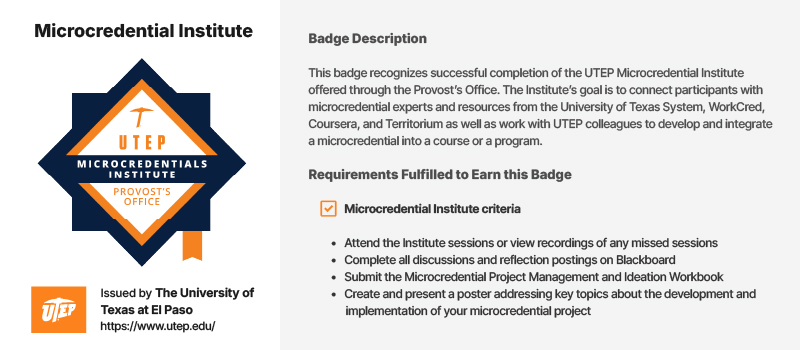
UTEP faculty and staff are encouraged to develop microcredentials that provide value to learners by fostering the development of intermediate to advanced-level skills. Examples of current offerings are available in the Credential Catalog. Individuals who complete a UTEP microcredential earn a digital badge that includes verifiable metadata describing the skills and knowledge acquired, the activities completed to earn the badge, and the methods used to assess competency. See example below.
The following steps will help you plan, propose, launch, and deliver a new microcredential.
Step 1: Start planning your microcredential
First, we highly recommend completing the University of Texas System Microcredential Innovator course.
Second, complete the Microcredential Ideation Workbook. Completing this workbook will help you successfully complete the next two steps.
Step 2: Complete the proposal form
When you are ready, submit the Microcredential Proposal Form. This is a shorter version of the Microcredential Ideation Workbook and is used to collect information about your microcredential idea.
Step 3: Receive approval
The Microcredential Guidance Committee, comprised of a representative from each academic college, will meet with you to discuss your microcredential proposal and provide feedback. They will evaluate the proposal based on its quality, impact, strategic alignment, and overall viability. Approval of your microcredential is necessary to include it in the UTEP Credential Catalog and to qualify it for badging.
Step 4: Complete the catalog and badge information form
Once approved, we will create a catalog entry and the badge that will be awarded to completers. You can submit the information for the catalog and badge by completing the Microcredential Catalog and Badge Information. We share these with you for your approval.
Step 5: Develop and deliver the microcredential
Now it is up to you to develop and deliver the microcredential to the participants. If you need assistance with the process (requesting a Blackboard shell, developing the curriculum and assessments, designing the course, or anything else), please reach out.
Tips for developing a microcredential:
- Face-to-face programs should be supported by an online component that tracks learner engagement, houses resources, collects artifacts, and so on.
- The platform used for development and delivery must be one that provides learner support through the UTEP Helpdesk. Most of the time, this will be Blackboard. To request a shell, please email helpdesk@utep.edu.
- Curriculum must adhere to all copyright, intellectual property, accessibility, FERPA, and other applicable policies.
- Appropriate assessments must be built into the microcredential to ensure quality and achievement of the skills achieved and knowledge acquired.
- If the microcredential will also be offered to non-UTEP learners, the developer will need to consult with Professional and Public Programs for marketing, pricing, and registration, as applicable.
- If a microcredential will count for academic credit, the developer will need to consult with the Office for Curriculum Effectiveness and Improvement.
Step 6: Award badges to completers
When you are ready to award the badges to those who have completed the microcredential, please send an Excel spreadsheet with the learners’ names and email addresses to Beth Brunk at blbrunk@utep.edu.
Additional Information
Updates and Assessment
- We strongly suggest surveying participants about their experiences and then using the feedback to make learner-centered improvements. Microcredentials should also be updated regularly to stay current.
- Annual completion data will be collected and shared with the Microcredential Guidance Committee.
Discontinuation
- A microcredential may be discontinued when it becomes outdated, is not sustaining enrollment, or other conditions make it difficult to deliver consistently.
- A discontinue notification should be sent to the Beth Brunk at blbrunk@utep.edu so that the microcredential can be removed from the catalog.
- Any students currently participating in the microcredential should be given the opportunity to complete it prior to its discontinuation.


