
How to Identify Credible Sources: 4 Ways to Find Reliable Information Online
Last updated August 2026
When writing research papers or gathering information for class, your work is only as strong as the sources behind it. AI tools and the internet make research more convenient than ever, but they also raise a critical question: How do you know if a source is credible?
Credible sources provide trustworthy, accurate information supported by evidence and created by authors or organizations with appropriate expertise. Reliable sources are also transparent about where their information comes from and give readers a way to verify important claims.
Knowing how to evaluate sources can help you distinguish credible information from misleading, outdated or unsupported content. Below are four key ways to evaluate sources, along with additional guidance on the CRAAP test, primary vs. secondary sources, scholarly and peer-reviewed research and where to find reliable information online.
4 Ways to Determine if a Source Is Credible
1. Check the Domain Name — But Don’t Stop There
One of the quickest ways to get a first impression of a website’s credibility is to look at its domain ending, also known as its top-level domain or TLD.
A domain can provide useful context, but it is only one factor to consider when evaluating a website’s reliability.
- .edu: Used primarily by educational institutions. These websites can be strong sources of academic or institutional information, but an .edu address does not automatically make every page scholarly.
- .gov: Used by government agencies. Government websites are often reliable sources for laws, statistics, reports, public programs and policy information.
- .org: Often associated with nonprofit organizations — but are .org websites reliable? Not always. Anyone evaluating a .org site should consider the organization’s mission, funding, purpose and potential bias.
- .com: Commercial websites. Some publish high-quality journalism, research or educational information, while others primarily exist to sell products or services.
- .net: Originally intended for network-related organizations but now broadly available. A .net site is not automatically reliable or unreliable; look for expert authorship, evidence and current information.
And remember: a .org website is not always a scholarly source. Scholarly sources are typically written by experts and published through academic channels such as peer-reviewed journals.
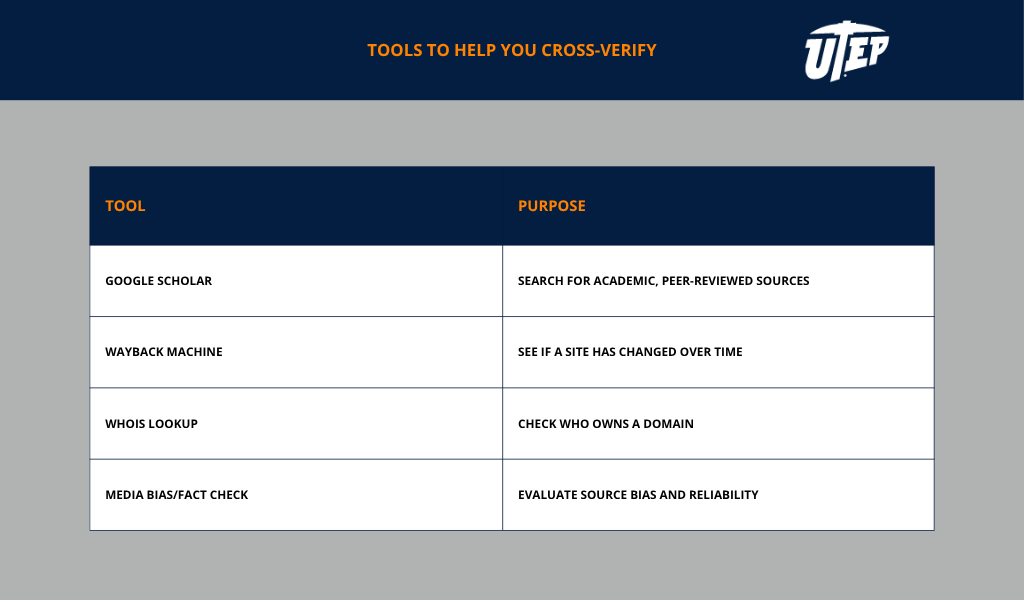
You can also use an ICANN WHOIS lookup to learn more about who owns a domain and the organization behind a website.
2. Look Closely at the Author, Sources and Publication Date
A credible source usually begins with a credible author. Before trusting information, investigate who created it and whether that person or organization has relevant expertise.
Is the author clearly identified?
Look for a full name rather than a username or initials. Check whether the author has relevant credentials, professional experience or academic expertise.
What are the author’s affiliations?
Consider whether the author is associated with a university, research institution, government agency, news organization, advocacy group or private company. Look for an About, Staff or Editorial Standards page to better understand the organization behind the content.
Is the information current enough?
Publication date matters more in some subjects than others. Information in health care, science, technology, artificial intelligence and law can change quickly, while older sources may remain useful for historical or theoretical topics.
Check whether:
- the source has a publication or update date
- its links and references still work
- newer research has changed what is known about the topic
3. Cross-Verify the Information — Don’t Take One Source at Face Value
A professional-looking website or the presence of statistics is not enough to establish credibility.
One of the best ways to assess credibility is to compare the information with other independent, reputable sources.
This process is sometimes called lateral reading. Instead of staying on one page and evaluating the website only by what it says about itself, open additional tabs and investigate what other sources say about the same claim, author or organization.
Can I find the same information elsewhere?
Important claims should usually be supported by other reliable sources, particularly government reports, academic research, established news organizations or respected professional associations.
Can I find the original source?
Trace statistics, quotations and research findings back to where they were originally published whenever possible. A website may cite legitimate research but misinterpret what the study actually found.
Are there peer-reviewed sources supporting the claim?
Search Google Scholar, PubMed or the UTEP Library for scholarly research.
Do independent fact-checkers support the claim?
For disputed or widely shared information, compare evidence with resources such as Snopes, PolitiFact, FactCheck.org or Media Bias/Fact Check.
Watch for warning signs such as:
- a major claim appearing on only one website
- multiple sites repeating information that all traces back to the same source
- research being cited inaccurately or taken out of context
- vague references to “experts” or “studies” without verifiable citations
4. Look for Evidence, Transparency and Purpose
Reliable sources should make it easy to understand where their information came from and why it was published.
Look for citations, links to original research, clearly identified authors and information about the organization responsible for the content.
Then consider the source’s purpose. Is it intended to inform, educate, persuade, advocate, entertain or sell something?
A source having a particular purpose does not automatically make it unreliable. Government agencies, businesses, nonprofits and advocacy groups can all publish valuable information. But understanding a source’s purpose can help you recognize potential bias and determine whether additional verification is needed.
Be especially cautious when a source makes strong claims without evidence, relies heavily on emotionally charged language or does not clearly identify who created the content.
How to Evaluate Sources With the CRAAP Test
The CRAAP test is a widely used framework for evaluating sources. Created by librarian Sarah Blakeslee at California State University, Chico, it focuses on five factors: Currency, Relevance, Authority, Accuracy and Purpose.
- Currency: Is the information recent enough for your topic?
- Relevance: Does it directly address your research question and meet the needs of your assignment?
- Authority: Who created the information, and what qualifications or affiliations do they have?
- Accuracy: Is the information supported by evidence, citations and other credible sources?
- Purpose: Why was the information created, and could that purpose influence how the topic is presented?
The CRAAP test can be a useful starting point when deciding whether to use a source, but it should not replace judgment. A source can perform well in one category and poorly in another, so consider the full context of your research.
Primary vs. Secondary Sources: What’s the Difference?
Understanding primary vs. secondary sources can also help you choose appropriate research materials.
A primary source provides original or firsthand evidence. Examples include:
- original research studies
- interviews
- surveys and datasets
- diaries and letters
- historical documents
- speeches
- government records
- photographs or recordings
A secondary source analyzes, interprets or summarizes primary sources. Examples include textbooks, literature reviews, biographies, scholarly analyses and many news articles.
The Library of Congress provides additional guidance on distinguishing primary from secondary sources.
Importantly, a primary source is not automatically more credible than a secondary source. A firsthand account may contain bias or incomplete information, while a strong secondary source may synthesize evidence from many reliable primary sources.
The best type of source depends on your research question and how you plan to use the information.
What Are Scholarly and Peer-Reviewed Sources?
Scholarly sources are generally created by researchers, academics or other subject-matter experts for an academic or professional audience.
They often include:
- clearly identified authors and affiliations
- citations and reference lists
- supporting evidence or research methods
- technical or discipline-specific language
- publication through academic journals, university presses or professional organizations
Many scholarly journal articles are also peer reviewed, meaning other experts in the field evaluate the work before publication. However, not all scholarly materials are peer reviewed.
A web address is only one clue and cannot establish whether a source is scholarly. A page ending in .edu or .org may provide excellent information, but that does not necessarily make it a peer-reviewed academic source.
How to Find Credible Sources for Research
Knowing how to evaluate a source is important, but so is knowing where to find credible sources in the first place.
For research papers and academic projects, start with scholarly search tools, library databases and reputable government or institutional websites.
Good places to find reliable information include:
- Google Scholar: Search scholarly articles, theses, books and other academic publications.
- JSTOR: Find journal articles, books and primary sources across many academic subjects.
- PubMed: Search biomedical and life sciences research.
- PubMed Central: Access free full-text biomedical and life sciences articles.
- UTEP Library: Find scholarly journals, books and research databases that may not be freely available through a general web search.
- Government websites: .gov sources can be useful for official statistics, laws, regulations, datasets, reports and public policy information.
Common types of credible sources include peer-reviewed articles, scholarly books, government and institutional reports, and primary sources such as original studies, interviews and official records.
No single type of source is best for every assignment. Always consider what information you need and whether the source meets your instructor’s requirements.
Are Wikipedia, Blogs and AI Tools Credible Sources?
Wikipedia, personal blogs, online forums and AI tools such as ChatGPT or Google Gemini can all be useful during the research process, but they should generally be treated differently from scholarly or primary research sources.
- Wikipedia can be helpful for getting an overview of a topic and identifying terminology. Its reference sections can also lead you to original or more authoritative sources.
- Blogs and forums can provide useful perspectives, especially from practitioners or people with firsthand experience. However, verify the author’s credentials, publication date and supporting evidence before relying on the information.
- AI tools can help explain concepts, brainstorm research questions or organize ideas. However, AI-generated responses can contain errors, unsupported claims or inaccurate citations. Important facts and references should always be verified against original, credible sources.
A useful rule is: Use these tools to help you find or understand information, but cite the credible source behind the information whenever possible.
Need Help Evaluating a Source?
If you are unsure whether a source is reliable, you can ask for help from:
- your professor
- the University Writing Center at UTEP
- the UTEP Library
The UTEP Library also offers research support by:
- Email: libraryref@utep.edu
- Text: 915-249-3383
- Phone: 915-747-5643 or 915-747-5638
Ready to Put These Research Skills to Work?
Learning how to evaluate information is an important part of becoming a stronger student, researcher and critical thinker.
UTEP’s online programs give students opportunities to build those skills and apply them in academic and professional settings while continuing their education on their terms.
Keep Learning, Keep Growing
If you’re looking for more strategies to stay focused, organized and successful as an online student, explore these UTEP Online resources:
- What Are the 10 Rules of Netiquette?
- 11 Inspirational Thoughts for Students Balancing Work and School
- 7 Ways to Organize Your Study Space for Success
- 4 Memory Techniques for Successful Study Sessions
- How to Pencil In Your School and Work Obligations
- 6 Prioritization Techniques for When Everything Seems Important


